Every AI, one app
Claude Code, Gemini CLI, Codex, Aider, your own scripts — if it runs on your computer, it runs in Termixa. No per-vendor mobile apps, no waiting for official clients, no lock-in. A new AI tool drops tomorrow? It already works.
- Vendor-neutral: anything that runs in a terminal
- Up to 6 parallel workspaces — agent, logs, git, server
- Rename workspaces so you never lose track
❯ claude
✻ Working: refactoring auth module…
⏺ 4 files edited · waiting for approval
> approve, then run the tests
Remote development, not remote viewing
Direct the work mid-task. Approve or reject plans the moment your AI asks. Run commands, execute tests, commit and push — on your real machine, in your real project.
- Smart key row: TAB, CTRL, ESC, arrows — interactive CLIs just work
- Real shell tab-completion from your machine
- One-tap Quick Commands for the things you run daily
- Sessions restore exactly where you left off — scrollback included
❯ npm test
✓ 128 passing (4.2s)
❯ git commit -am "dark mode" && git push
→ main 3f2c1a9 · pushed
localhost on your phone, from anywhere
Your AI just built a web app on localhost:3000. Open it on your phone — from a different city if you like — rendered as if your phone were plugged into your computer. No deploy, no public URL, no tunnel service.
- Zero-trust port whitelist — nothing is reachable unless you allow it
- Pages travel through the same encrypted peer-to-peer channel
- Look at what the AI built, then tell it what to change — same screen
Run your mobile app on a real phone — no cable, no build
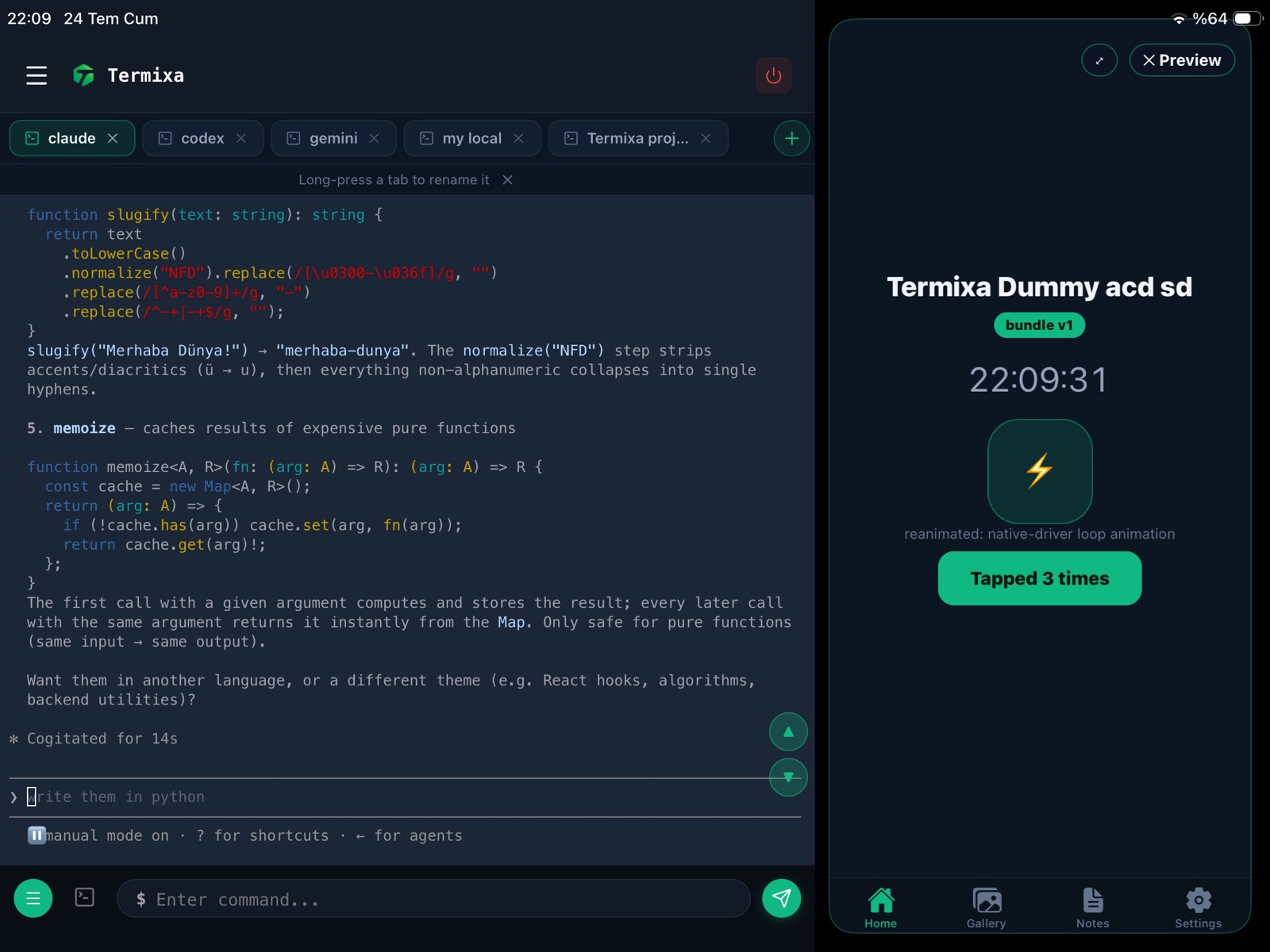
Building a React Native / Expo app? Start the dev server on your computer, tap Preview Mobile App on your phone, and your app boots natively inside Termixa — over the same encrypted tunnel, from any network. Save a file and your changes land on the device in your hand.
- Real native rendering on a real device — not a screenshot stream
- Auto-reload over the tunnel: save on the desktop, the app updates on the phone
- On iPad: terminal and your running app side by side — a full dev studio
- Works with Expo SDK 56 projects using Termixa's bundled module set (navigation, reanimated, gesture-handler, SVG, expo-image and more) — custom native modules aren't supported
- Pro feature · included in every 7-day trial
Scan a QR code. That's the setup.
No static IPs, no router configuration, no SSH keys, no VPN profiles. If both devices are online — any Wi-Fi, 5G, hotel network, office NAT — Termixa connects them. When a network blocks the direct path, an encrypted relay bridges it automatically via the nearest region.
- Works across any two networks, automatically
- The Connector runs on macOS, Windows, Linux — and headless servers over SSH
- Global relay network with automatic geo-routing

[status] Waiting for mobile device…
Your code never leaves home
Unlike cloud IDEs, your projects stay on your machine. Sessions are end-to-end encrypted and peer-to-peer first — in most sessions your data never touches a server at all. Our infrastructure only introduces your two devices and checks your subscription.
- End-to-end encryption on every session
- Nothing logged, nothing stored — ever
- PIN-protected pairing with rotating codes
- Managed device list + kill switch on both sides
your commands ......... nothing
your output ........... nothing
your code ............. nothing
your web apps ......... nothing
your subscription ..... yes (that's it)
How Termixa compares
| Vendor AI apps | Cloud IDEs | SSH clients | Remote desktop | Termixa | |
|---|---|---|---|---|---|
| All your AIs in one place | ✗ | partial | ✗ | ✗ | ✓ |
| Code stays on your machine | ✓ | ✗ | ✓ | ✓ | ✓ |
| Setup effort | low | migrate all | keys, IPs | heavy | scan a QR |
| Works across any network | ✓ | ✓ | VPN needed | laggy | ✓ automatic |
| localhost preview on phone | ✗ | public URLs | ✗ | squinting | ✓ private |
| Run your mobile app natively on a phone | ✗ | simulator only | ✗ | ✗ | ✓ RN/Expo |
| Designed for supervising agents | partial | ✗ | ✗ | ✗ | ✓ |